
NEWVault Insights AI: ask your vault anything, cited to the source.See how it works
FutureVault
ONBOARDING & ACCOUNT OPENING
Collect. Sign. File.
Open.

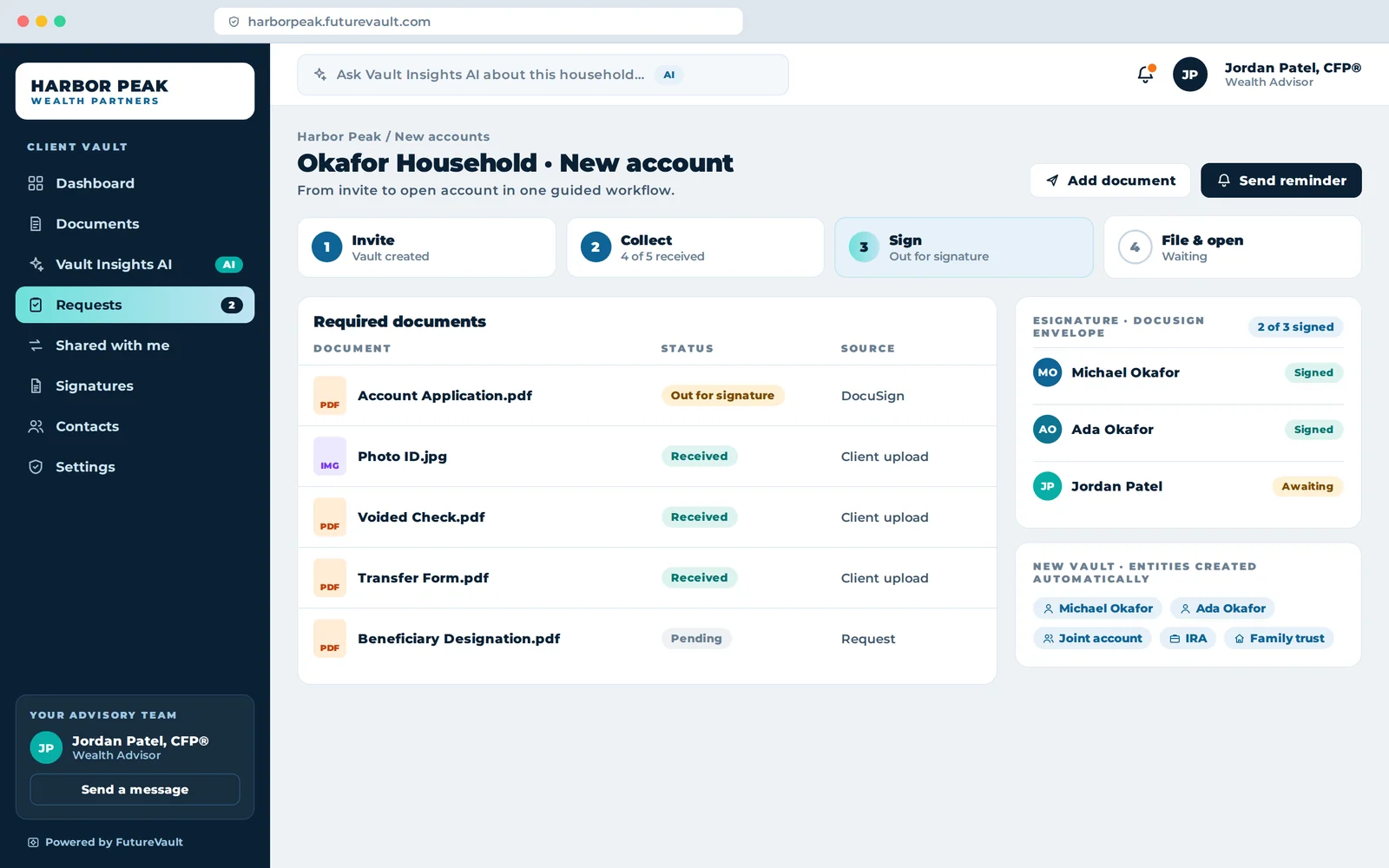
Collect, sign and file new-account paperwork in one guided workflow, with DocuSign and Adobe Sign built in and a branded vault created for every new client.

New account workflow with documents, eSignature and vault entities
READY FOR REVIEWNew account package is complete and signed.Account application.pdf
NEW ACCOUNTSThis week38accounts opened in one guided workflow
NEW ACCOUNT · 3 OF 4ApplicationKYCeSignatureTransfer form
The challenge

The first impression of your firm shouldn’t be a stack of paper.

Paperwork that drags onNew accounts wait weeks on printing, scanning, signing and couriers.
Missing and incorrect formsNot-in-good-order paperwork sends clients back to the start.
A first impression of frictionClients judge the relationship by how easy it is to begin.
Inside Onboarding

Collect. Sign. File. Open. In one flow.

HARBOR PEAKWEALTH PARTNERS
1InviteClient receives a branded invitation
2CollectID and documents uploaded
3SignDocuSign or Adobe Sign, built in
4OpenAccount paperwork filed and submitted
One guided flowFrom invitation to an open account, without the paper chase.
New account · Chen Joint3 of 4
Government ID
Proof of address
New account form
Risk questionnaire
Always in good orderRequired items tracked until every box is ticked.
New Account Application.pdfPre-filled
Account typeJoint, non-registered
Primary holderKevin Chen
Joint holderMei Chen
Risk profileBalanced
Forms that fill themselvesClient data captured once, reused everywhere.
Daysto open, not weeks
Days, not weeksFrom first invite to open account.
KCKevin ChenClient
JPJordan PatelAdvisor
NANew accounts teamReview
CComplianceApproval
Everyone in one placeClients, advisors and operations work from the same file.
Kevin Chenuploaded government ID · 2 min ago
Kevin Chensigned new account form · 14 min ago
New accounts teamapproved application · 1 hr ago
Audit-ready from day oneEvery step of onboarding, timestamped.
How it works

Four steps to a new account.

  1. 1InviteThe client’s branded vault is created.
  2. 2CollectID, voided checks and transfer forms arrive securely.
  3. 3SignApplications go out for eSignature.
  4. 4FileSigned forms are filed automatically.
2
eSignature integrations
100%
Steps logged
Day 1
Client vault ready
1M+
Client vaults
WHY FUTUREVAULT LEADS

The document infrastructure
others are measured against.

See how we compare
#1Integrations in Client File SharingEzra Group integration score, 8.82/10
1,000+API endpointsPlus 7,000+ apps through Zapier
350KFiles delivered per hourCustodial delivery at enterprise scale
SOC 2Type II examinedOperational security, independently examined
1,325%ROI on IDPDocumented for a tier-1 institution
MCPGoverned AI, built inClaude, ChatGPT and agents, permissioned and logged
NOT EMAIL ATTACHMENTSNo vault, no permissions, no audit trail, and no way to take a document back.
NOT GENERIC FILE SHARINGBuilt for internal teams and shared links, not for clients, households and custodians.
NOT DOCUMENT DRAWERSStorage without custodial delivery, document intelligence or governed AI.
FAQ

Onboarding questions, answered.

Which eSignature tools are supported?

DocuSign and Adobe Sign. Signed documents are filed automatically and new vaults can be created during onboarding.

Can new clients get their vault immediately?

Yes. A branded vault can be created for every new client at the start of onboarding.

Does it connect to our identity provider?

Yes. Active Directory integration maps roles and permissions and creates admin accounts and vaults.

Is FutureVault secure enough for our compliance and InfoSec teams?

FutureVault is SOC 2 Type II examined, encrypts data in transit and at rest, supports multi-factor authentication and records every action on a complete audit trail.

What does FutureVault integrate with?

Custodians including Schwab, Axos, CI Investment Services, NBIN and Fidelity Clearing Canada; CRMs including Salesforce and Microsoft Dynamics; DocuSign and Adobe Sign; portfolio, alternatives and identity platforms; Zapier; and 1,000+ API endpoints. FutureVault holds the highest Ezra Group integration score in Client File Sharing.

Will our clients actually use it?

Client vaults carry your brand on web, iOS and Android, with notifications when new documents arrive and simple, secure requests. FutureVault powers more than 1 million client vaults across 50+ enterprise partners.

The platform

Better together.

Platform overview
Digital VaultBranded client vaults on web, iOS and Android.Explore Vault Insights AIAsk any vault a question. Answers cited to the source.Explore Intelligent Document ProcessingClassify, extract and act on document data at scale.Explore Document LakeEvery document from every source in one governed place, ready for retrieval and AI.Explore Document Lake Bulk Document DistributionUp to 350,000 files an hour, each in the right vault.Explore Secure Document ExchangeRequests, checklists and two-way sharing. No email attachments.Explore FutureVault MCPConnect Claude, ChatGPT and your AI tools, fully governed.Explore Security & TrustSOC 2 Type II, encrypted in transit and at rest.Explore